| 01 Installation.mp4 |
MP4 File |
11.8 MB |
Nov 21 2022 4:05 PM |
| 02 Usage.mp4 |
MP4 File |
15.9 MB |
Nov 21 2022 4:05 PM |
| Beta versions |
<Directory> |
<Directory> |
Jul 8 2025 9:58 AM |
| DimluxOpticlimateUpdater v1.0.25.zip |
ZIP Archive |
11 MB |
Sep 4 2026 11:42 AM |
| DimluxOpticlimateUpdater_windows-x64_1_0_21.exe |
Windows Executable |
55.1 MB |
May 31 2023 3:29 PM |
| Java 21.0.7_6.msi |
Windows install file |
33.4 MB |
Jun 13 2025 12:55 PM |
| defender.png |
PNG Image |
39.3 KB |
Dec 7 2022 3:50 PM |
Downloads, DimluxOpticlimateUpdater
Installation of the DimluxOpticlimateUpdater
See downloadble files at the bottom of this page
Download ‘DimluxOpticlimateUpdater.exe’
double click on the downloaded file icon
A warning 'Windows protected your PC' could popup. If so:
Click on 'More info'
Click the button 'Run anyway'
Updating a LED-fixture
Connect the LED-fixture to the mains.
Connect a network cable between the IN and OUT-2 port.
Start the DimluxOpticlimateUpdater.
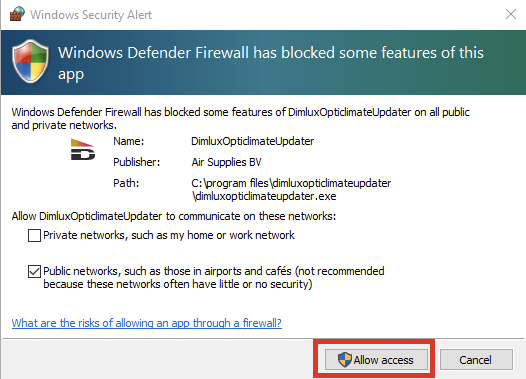
A warning of 'Windows Defender Firewall' can occure. Allow access.
Connect the computer by WiFi to the LED-fixture.
Wait untill the computer is connected.
Select WIFI mode at the DimluxOpticlimateUpdater.
Select attached LED-fixture.
Press Start.
See the video 'Installation and Usage for more detail'
Last update: 23 feb 2023

